



When I need groceries without turning a quick shop into a full errand, ALDI Grocery Pickup & Delivery is the kind of app I consider first. It is a free shopping app from ALDI International Services SE & Co. oHG, built around the practical appeal of ordering everyday items through a familiar supermarket rather than browsing a giant general marketplace. My experience is that its value comes less from flashy extras and more from reducing the number of decisions between realizing I need food and getting the order sorted.
The starting condition matters. This is most useful when I already know the shop I want to make, when I am short on time, or when carrying groceries home would be awkward. If I am looking for unusual brands, specialist ingredients, or the widest possible selection, I would not automatically choose it. ALDI’s identity is central to the experience: the app makes sense for someone who wants the retailer’s everyday low-price approach and a focused grocery basket, not an endless catalog.
From a grocery list to a completed order
Beginning with the basket
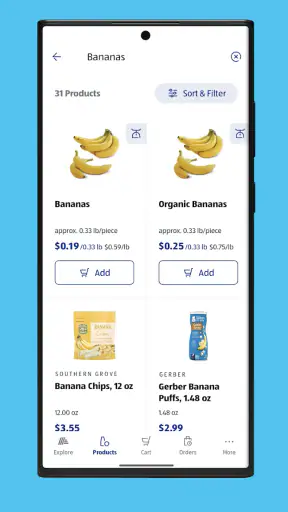
I find the smoothest workflow starts before opening the app. I make a rough list grouped by the way I shop: fresh food, cupboard items, chilled products, household needs, and anything I must not forget. That small preparation is more useful here than casually scrolling, because the app is best treated as a digital version of an ALDI visit. I can then search for the essentials, check what is available, and build the basket with a clear purpose.
That approach also helps control impulse buying. A supermarket app can make adding items feel effortless, so I prefer to decide whether something is genuinely needed before placing it in the basket. For a weekly shop, I check the quantity of each item rather than assuming that the first selection is enough. For a smaller top-up, I keep the list narrow and avoid spending more time browsing than I would have spent in the store.
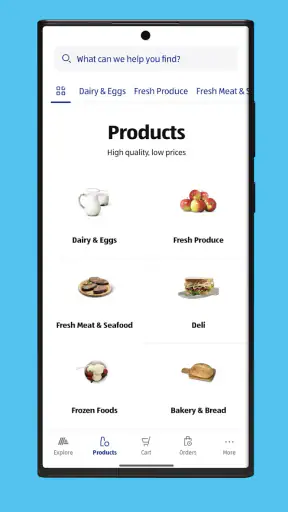
The app’s straightforward shopping focus will appeal to people who already understand ALDI’s range. I do not open it expecting the same breadth as a large online marketplace. Instead, I use it to locate familiar grocery categories and assemble a practical order. That distinction is important: the experience is convenient because it stays close to the supermarket, while the trade-off is that it does not feel like a universal food-search engine.
Checking the details before moving on
Before I treat the basket as finished, I review product names, sizes, quantities, and the total order. This is one of the most important habits with grocery pickup or delivery. A small mistake in a pantry item is easy to fix later, but an incorrect size or missing ingredient can turn a convenient order into another trip. I also look at the selected fulfillment option and any available scheduling information before committing.
This review stage is where the app saves time compared with writing a list and walking through every aisle, but it also places more responsibility on me. In a physical store, I can pick up a package and compare it with the item beside it. In the app, I need to read carefully and make sure the product I chose matches the recipe or household job I had in mind. I would especially slow down when ordering similar products for different purposes, such as cooking ingredients and ready-to-eat items.
A useful habit is to keep the final check separate from the browsing stage. I first add everything I think I need, then inspect the basket as if I were checking someone else’s order. That catches duplicate items, forgotten staples, and quantities that do not fit the week. The basket review is not just an administrative step; it is the point where online convenience becomes a reliable grocery plan.
Choosing pickup or delivery
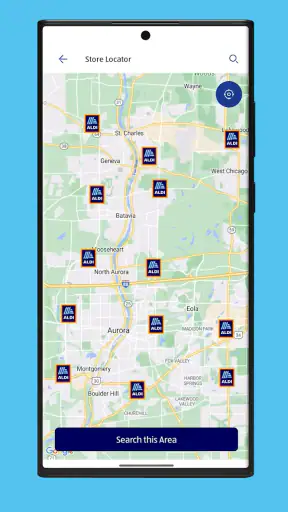
The choice between pickup and delivery changes the whole handoff. Pickup works well when I am already passing near an ALDI location and want to avoid walking through the store. Delivery is more useful when the journey itself is the problem, whether I am managing a heavy shop, a busy day, or limited mobility. I decide based on the last part of the process, not only on how quickly I can fill the basket.
For pickup, I think about timing and transport. The order may be ready, but I still need to reach the store and make room for the groceries. That makes it a good compromise for someone who wants to skip aisle-by-aisle shopping but can easily collect the order. Delivery removes that journey, yet it introduces a different dependency: I need to be available for the arrival and prepared to check the groceries afterward.
For either option, I would not wait until the last possible moment if the food is needed for a specific meal. Grocery availability and scheduling are practical parts of the experience, and plans can become fragile when there is no time left to adjust. The safest workflow is to place the order early enough that a missing item or a change in timing does not ruin the evening’s cooking plan.
The handoff is where expectations meet reality
With pickup, the handoff is simple in concept: I arrive, identify the order as required, and take the bags with me. The benefit is control. I know exactly when I am collecting the groceries, and I can move on without spending time selecting every item in the store. The drawback is that pickup is not door-to-door convenience; it still requires a trip, and a large order may be inconvenient to carry without suitable transport.
With delivery, the handoff moves to my home. I need to be ready to receive the order and then check it while the details are still fresh in my mind. I prefer to keep the shopping list nearby so I can compare the main items quickly. This is particularly helpful for fresh food, chilled products, and anything bought for a planned meal. The app can simplify ordering, but it cannot remove the need for a sensible receiving routine.
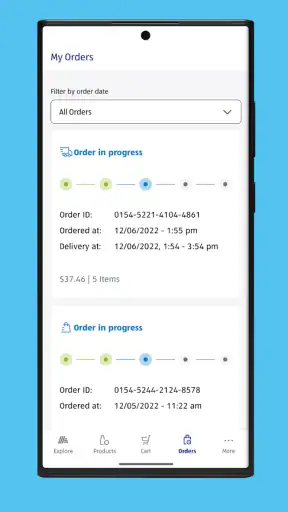
That receiving step is one of the less obvious trade-offs. People often think the job ends when the order arrives, but the real outcome depends on whether the groceries are complete and usable. I put cold items away first, then check the rest against the basket. If something is unsuitable, I want to notice it before I start cooking or put the receipt and order details out of reach.
A realistic weeknight example
Imagine I finish work late and need ingredients for breakfast, packed lunches, and a simple dinner. I open the app, search for the core items, and build the order without trying to recreate an entire supermarket visit. I choose delivery if getting to the store would delay the evening, or pickup if I am already driving past an ALDI location. Before confirming, I check quantities and make sure the order covers the meal rather than only the most obvious ingredient.
When the groceries arrive, I put chilled products away immediately and compare the rest with my list. If everything is present, the app has done exactly what I needed: it has shifted the time-consuming part of shopping away from the evening. If an item is unavailable or the order does not match my plan, the convenience is reduced, because I now need a replacement decision. That is why I avoid relying on the app for a single irreplaceable ingredient when there is no backup plan.
What the app does well for regular shoppers
The strongest use case is repeatable shopping. Once I know the types of products I normally buy, I can approach the app with a routine instead of learning a new system every time. That makes it suitable for weekly grocery planning, household restocking, and smaller top-up orders where the goal is to avoid an unnecessary store visit.
It is also a sensible option for shoppers who prefer a retailer-specific experience. A general delivery marketplace may offer more stores in one place, but that can mean comparing sellers, ranges, and substitutions across a more complicated interface. Here, the decision is narrower: I am shopping with ALDI and judging whether its available selection meets my needs. For many everyday baskets, that focus is an advantage.
The app has also earned a strong response from its audience, with a 4.8 average from around 45 thousand ratings and more than 5 million installs. Those figures do not guarantee that every order will be perfect, but they suggest that the basic shopping workflow works well for a substantial number of people. I would still judge it by my local availability and the kind of basket I usually create.
Where it is less convincing
The biggest limitation is that digital convenience cannot expand the retailer’s range beyond what ALDI offers through the service. If I need a very specific brand, a hard-to-find international ingredient, or a broad comparison of competing products, I am better served by a larger supermarket platform or by visiting several retailers. The app is not the right tool simply because it is an app.
I also find that online grocery shopping can make substitutions and product interpretation more stressful than in-store shopping. A photograph and product title may be enough for a familiar item, but not always for something where size, flavor, or intended use matters. I therefore avoid building a tightly timed recipe around an item unless I am confident that the selected product will meet that need.
Pickup is not ideal when I am already overloaded or do not have convenient transport. Delivery is not ideal when I need complete control over choosing fresh produce myself or when my schedule makes receiving an order difficult. In those situations, a normal store visit can be more predictable, even if it takes longer. The better option depends on which inconvenience I am trying to remove.
Practical habits that improve the experience
I recommend making the basket in two passes. The first pass is for finding products; the second is for checking the order as a whole. This prevents the common mistake of remembering each item individually but missing the fact that the basket lacks a complete meal, contains duplicates, or has an impractical quantity.
I also separate essentials from optional items mentally. If the order needs to be adjusted, I protect the ingredients and household necessities first. That is more useful than treating every item as equally important. For delivery, I keep the receiving area clear and plan enough time to inspect and store the groceries. For pickup, I consider how the order will travel from the collection point to the kitchen.
Another helpful trade-off is using the app for predictable staples while handling special purchases elsewhere. I might order routine breakfast foods and cleaning supplies through ALDI, then buy a specialist ingredient from another retailer. This mixed approach avoids forcing one service to solve every shopping problem and makes the app more valuable because it handles the part it is suited to.
Device support and everyday accessibility
The current version is 11.30.0 and supports devices running Android 8.0 or later. That makes it accessible to many people using older Android phones, although the real comfort of the experience still depends on screen size, connection quality, and how easily I can read product details. I would keep the app updated where possible, especially when relying on it for a scheduled order.
It is rated for Everyone, so its presentation is aimed at ordinary household shopping rather than a specialist audience. The app is free to install, which lowers the barrier to trying it. The meaningful cost question is not the download; it is whether the selected pickup or delivery arrangement fits the value of the time and effort I am saving.
My outcome after using it
For me, ALDI Grocery Pickup & Delivery succeeds when the goal is a focused, familiar grocery order with fewer aisles and fewer decisions. It works particularly well for repeat shoppers, busy households, people managing heavy baskets, and anyone who already prefers ALDI’s product range and low-price positioning. The handoff is clear enough when I plan around it, and the final result can be a much calmer shopping routine.
I would skip it when I need maximum variety, personal control over every fresh item, or a last-minute ingredient with no acceptable replacement. I would also avoid treating it as a replacement for planning: the app can organize the purchase, but it cannot decide what the household actually needs or guarantee that a rushed basket will support the intended meal.
Overall, I see it as a practical extension of ALDI rather than a universal grocery solution. Its best quality is focus, and its main weakness is the same thing: a focused supermarket service cannot match the range and flexibility of broader alternatives. If your normal shop fits ALDI’s selection, the free app is worth trying. If your shopping depends on specialist products or hands-on produce selection, a store visit or a broader grocery service will probably suit you better.
After the order is complete, I judge the experience by one simple outcome: did it remove a real task without creating another one? When I prepare the list, choose the right handoff, and check the basket carefully, the answer is usually yes. That is why I would recommend ALDI Grocery Pickup & Delivery to a friend who wants everyday grocery shopping to be more manageable, provided they understand where its focused approach stops being an advantage.


